How to allow cookies for Safari on iPhone
How to allow cookies for Safari on iPhone
While browsing on Safari on iPhone or iPad some time some website want cookies. But generally iPhone doesn't allow cookies. But it can be turn on 😀 . Let's see hoe to turn Or allow cookies on iPhone while browsing using Safari.
PLEASE NOTE : Cookies is your browsing details and your location. It allow a website to get more about what you like,finding,looking for or what you are watching in details . But it is now harmful. Websites use cookies to give you the best result what you are looking for .
PLEASE NOTE : Cookies is your browsing details and your location. It allow a website to get more about what you like,finding,looking for or what you are watching in details . But it is now harmful. Websites use cookies to give you the best result what you are looking for .
Steps to enable cookies using Safari for iPhone or iPod
Step 1 : From your Home screen, go to Settings
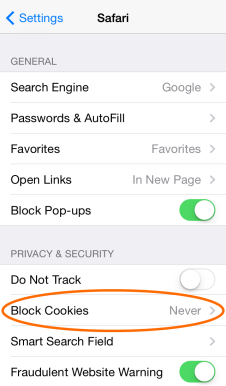
Step 2 : Then go to Safari
Step 3 : Then follow the bells steps For iOS 7 and iSO 6 Or lower versions -
For ISO 7 : Set Block Cookies to Never.
For iOS 6 and Lower versions: set Accept Cookies to Always.
Screenshots:
0 comments :