Showing posts with label Tutorials. Show all posts
How To Optimize Your Website’s Performance Or Increase Website loading speed

How To Optimize Your Website’s Performance Or Increase Website loading speed

Web pages and websites are getting bigger and becoming more complex every day. But when a website does not load quickly, it affects visitors’ behavior, which leads to decreases in sales conversions and revenue.
A website can slow down for a number of reasons, including low server memory, competing resources or data influx. If a web server is slow, it will hinder the website’s performance. Likewise, a site receiving a great deal of traffic can also slow down load times or disrupt a visitor’s experience entirely. Navigation, site design, images and apps can also affect how quickly and effectively a website is displayed.
Bottom line: Your website’s speed can be the difference between generating revenue and not generating revenue.
You should not stop monitoring a website’s performance. Monitoring your site should be part of your daily web design workflow. Check home page load time, checkout process load time, and conversion rates at regular intervals.
Web Performance Makes a Difference in Sales
Don’t think a couple of seconds can make a difference? Think again. According to Jupiter Research (which has since been acquired by Forrester), the average online shopper in 2006 expected a web page to load in four seconds. Today, those same shoppers expect web pages to load in two. Poor web performance is one of the biggest reasons people are dissatisfied when shopping online. People who experience performance issues will abandon a site or switch to a competitor. Because page load time is important to web browsers, even Google GOOG +0.1% has begun factoring site speed into their algorithm when ranking websites.
Responsive Web Design Also Affects Web Performance 
Website visitors expect the same type of experience on their mobile device as they do on their computers.
So now, not only do you have to think about how a website performs in various computer web browsers, you also have to think about optimizing a website for the many types of mobile devices. This is where responsive web design comes into play. Responsive web design (RWD) involves creating a site that adjusts depending on what type of device is doing the viewing. The text can be scaled down, to offer only the main text and images.
It’s important to note, though, that just because a site has responsive web design and looks good on a certain device, it does not necessarily mean that it will load faster. And just because it loads faster on a mobile device, does not mean a visitor or customer will stay on it longer.
Three Ways to Optimize Your Website
There are a few things you can do to make sure your site is performing at optimum speed. First, you can run a web page analyzer to help you see what is actually being loaded and what is taking the most time — and clean up any problematic HTML, CSS and Javascript code. Next , here are three best practices to consider:
Get a dedicated server. One way to improve performance is to move to a faster server or get a dedicated server. Although it may cost more, being on a slow server can cost you even more in sales long term.
Use a CDN. If your site has large amounts of content to display, consider using a content delivery network (CDN) — a company that employs a large system of servers placed in various locations to deliver web pages to visitors. Most CDNs are used to host static resources such as images, videos, audio clips, CSS files and JavaScript. The closer a CDN server is to a site visitor, the faster the content will be delivered to the visitor’s computer or mobile device. CDNs help improve global availability and reduce bandwidth. However, the main issue a CDN addresses is latency, or the amount of time it takes to deliver website pages to the visitor.
Compress images and text. Another way to improve website performance and speed up page load times is to compress images and text. A server does not have to send out as much data this way. Some hosting providers automatically compress websites, and there are a number of tools you can use to test whether or not it is compressed. Most sites are image heavy, so if you want to optimize an image without losing visual quality, you can use a tool like Yahoo YHOO +0.17%’s Smush.it. For web graphics, use GIFs or PNGs rather than JPGs.
Just like a physical store needs organizing, websites need cleaning. When it comes to page-load optimization, every kilobyte counts. Web performance is a critical part of a customer’s experience. Don’t put optimizing a website’s loading time on the back burner, as it can be detrimental to loyal readers or repeat business.

For over a decade, Mike Quinn has been active in website design and development. After completing formal training in multimedia technologies in 2002, he became a founding member of a Pittsburgh based design company, Yellow Bridge Interactive (YBI). YBI’s focus is creating SEO-friendly websites that utilize the latest design and programming techniques.
The Young Entrepreneur Council (YEC) is an invite-only organization comprised of the world’s most promising young entrepreneurs. In partnership with Citi, YEC recently launched StartupCollective, a free virtual mentorship program that helps millions of entrepreneurs start and grow businesses.
Banglalink 3G 2G iPhone APN or Internet Setting Step By Step Tutorial for iPhone

Banglalink 3G 2G iPhone APN or Internet Setting Step By Step Tutorial for iPhone

Banglalink Internet Settings for iPhone 4S,5 / iPad:

Go to Settings-> General -> Network->Turn ON Cellular Data Network 
Select Cellular Data Network   > APN and enter the following details

Cellular Data:
Banglalink Internet APN Settings for iPhone iPad Android
    APN: blweb
    Username: Blank
    Password: Blank
MMS:
    APN: blmms
How To Delete Empty Folder And Dublicate File / Folder From Your PC Easily

How To Delete Empty Folder And Dublicate File / Folder From Your PC Easily


Empty Folder or Dublicat content is a biggest problem . It wast a lots of space and we fell bore while serfing on our local hard drive . Today i am going to tell you the best way to delete dublicate or empty flie / folder from you pc in the easiest way .

How To Delete Empty Folder And Dublicate File / Folder From Your PC Easily


All those work we will do with a softwere named " Glary Utility " At first download this softwere from bellow link . If the link doesn't work then try searching on the google with softwere name .

Click Here To Download

After finished download install it . Then open the Softwere .

To delete empty folder : 
          To delete empty folder open the softwere . From softwere menu go to advance tools and go to Remove Empty Folders . Thus your empty folder will delete from your hard drive .

To Delete Duplicate file / Folder :
        To delete empty folder open the softwere . From softwere menu go to advance tools and go to Remove Empty Folders . Thus your empty folder will delete from your hard drive .

Thanks for reading . 
WiFi Password Hack System Recovery Method Full Tutorial (With Pictures) Windows 7 Special

WiFi Password Hack System Recovery Method Full Tutorial (With Pictures) Windows 7 Special

Everyone who use wifi must know what is wifi password. WiFi password is a type of security.Those who configure the WiFi, they know it. Sometime we forget our own password and do not know how to find wifi password from my own PC. Today i am going to show you the procedure to hack or recover saved password from any pc in the easiest way.

Step 1 :

WiFi Password Hack System Recovery Method Full Tutorial (With Pictures) Windows 7 Special

At first right click on the wifi icon (shown above image ) from the righg side of task bar and select " Open Network And Sharing Center" . Then a new windows will open.
Step 2 :

WiFi Password Hack System Recovery Method Full Tutorial (With Pictures) Windows 7 Special


From the menu select "Manage wireless networks" and again a new window will open .

Step 3 :
WiFi Password Hack System Recovery Method Full Tutorial (With Pictures) Windows 7 Special


In that new window you will find all th saved network you used recently . 

Step 4 : 


WiFi Password Hack System Recovery Method Full Tutorial (With Pictures) Windows 7 Special
From the networking list right click on the network server name which you want ro show /hack/recover password . A new pop up window open .

Step 5 :
WiFi Password Hack System Recovery Method Full Tutorial (With Pictures) Windows 7 Special

Now to see the password select Security Tab from the menu . Then select or tick on "Show Characters" (Num 2 On image ) . That's it . you will see you wifi password on password box as a plain text (Num 3 on image)
Thanks For Reading This Tutorial . if You like it and want to thank us , then share it . 
Have any question or face any problem ? Please Comment  .

Repair your lost HDD easily with HDD Low Level Format Tool! Full Repairing Tutorial (Truly Working)

Repair your lost HDD easily with HDD Low Level Format Tool! Full Repairing Tutorial (Truly Working)


I hope everyone is doing well. Today I got a software for you through which you can fix your lose PC or Laptop hard disk in your The name of this software is " HDD Low Level Format Tool ". For repairing your HDD you don't need to open your HDD. You just need to install the software on your PC and connect the lost hard disk to your PC or laptop .

Yesterday I found than my Laptop Hard Drive isn't working . Then i use this software and successfully repair my waste laptop hard disk .

Ok . Fine . Let's start ;-)

You Will Need :    
  • A well working laptop / PC
  • A  waste hard drive which you have to repair 
  • HDD low level formatting Tool  - Download Now 
  • Connecting Cable 


Steps :
  •   Download The Software , install and open it .
  •  Connect the waste hard drive as 2nd / secondary hard drive with your running PC or Laptop .
  • Now open the Software and you will see two hard drive name list . ( See Picture Bellow)
 
Repair your lost HDD easily with HDD Low Level Format Tool! Full Repairing Tutorial (Truly Working)
  • Then select that hdd name which you want to repair and Click " Continue >>> "
  •  Now from the window menu tab select LOW LEVEL FORMAT ( See Picture Bellow)

Repair your lost HDD easily with HDD Low Level Format Tool! Full Repairing Tutorial (Truly Working)

  • Then click on " FORMAT THIS DEVICE "
 All done . Now wait for compliting the formating . It may take a long time for big size hard drive . After converting your HDD should be ready for use .

Thank for reading. If you face any problem please comment .
How to allow cookies for Safari on iPhone

How to allow cookies for Safari on iPhone

While browsing on Safari on iPhone or iPad some time some website want cookies. But generally iPhone doesn't allow cookies. But it can be turn on 😀 . Let's see hoe to turn Or allow cookies on iPhone while browsing using Safari.

PLEASE NOTE : Cookies is your browsing details and your location. It allow a website to get more about what you like,finding,looking for or what you are watching in details . But it is now harmful. Websites use cookies to give you the best result what you are looking for .

Steps to enable cookies using Safari for iPhone or iPod

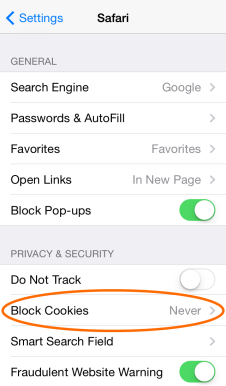
Step 1 : From your Home screen, go to Settings

Step 2 : Then go to Safari

Step 3 : Then follow the bells steps For iOS 7 and iSO 6 Or lower versions -

For ISO 7 : Set Block Cookies to Never.

For iOS 6 and Lower versions: set Accept Cookies to Always. 


Screenshots: 


Manage your voice, MB, Internet, SMS, with freely period with Grameenphone Flexi Plan ! ( Pack Buying Tutorial )

Manage your voice, MB, Internet, SMS, with freely period with Grameenphone Flexi Plan ! ( Pack Buying Tutorial )

I thing you understand this by the name of the post . Yes , it is Grameenphone Flexi Plan which organized through the year, by which you can pick of make your own requirements such as talktime, Internet/MB, sms for your chosen period / validity .  

Manage your voice, MB, Internet, SMS, with freely period with Grameenphone Flexi Plan ! ( Pack Buying Tutorial )


There are some advantages. Let us that your phone has 500 MB internet with just two days left in the period validity . When you buy the package will extend to another. But the packages of 4 mb internet valid only for two days. To increase your mb validity generally you have to buy 75 mb internet pack by 25 taka . But with Flexyplan you can pick up 4 mb internet with 30 days validity just in 1 ( One ) taka !! It save the money. 

You can also send internet pack / talk time / sms to othere. This means that you can send internet pack / talk time / sms to friends or Daddy (I sometimes do this) .

 How to Buy a internet Pack or sms or talktime with GP Flexi Plan :


     At first go to any phone or PC's browser Sign in http://www.grameenphone.com/flexi-plan this link. It will appear as like as the image given below. Which you want choose and click on this to Select. Then click on the BUY NOW option for byeing the pack made.


Manage your voice, MB, Internet, SMS, with freely period with Grameenphone Flexi Plan ! ( Pack Buying Tutorial )


 Now follow the step which given on bellow Images :

Step 1 :

Manage your voice, MB, Internet, SMS, with freely period with Grameenphone Flexi Plan ! ( Pack Buying Tutorial )

 Step 2 :


Manage your voice, MB, Internet, SMS, with freely period with Grameenphone Flexi Plan ! ( Pack Buying Tutorial )

 Confirmation Sms Demo :


Manage your voice, MB, Internet, SMS, with freely period with Grameenphone Flexi Plan ! ( Pack Buying Tutorial )


Copyright © 2015. My Tube 71
Blogger Templates